Control Pad (Mega Drive)
From Sega Retro

| |||||||||||||||||||||||||||||||||||||||||||||||||||||||
| Control Pad | |||||||||||||||||||||||||||||||||||||||||||||||||||||||
|---|---|---|---|---|---|---|---|---|---|---|---|---|---|---|---|---|---|---|---|---|---|---|---|---|---|---|---|---|---|---|---|---|---|---|---|---|---|---|---|---|---|---|---|---|---|---|---|---|---|---|---|---|---|---|---|
| Made for: Sega Mega Drive | |||||||||||||||||||||||||||||||||||||||||||||||||||||||
| Manufacturer: Sega | |||||||||||||||||||||||||||||||||||||||||||||||||||||||
|

The Sega Mega Drive Control Pad (コントロールパッド) is the official controller of the Sega Mega Drive (or Sega Genesis in North America). Three button controllers are known officially as Control Pads in both North America and Europe, and SJ-3500s in Japan (following a system set up by the SG-1000). There are many "updates" and alternatives to this controller, the most notable being the Six Button Control Pad. This article covers only the basic three button variants.
Contents
Hardware
Mega Drive control pads are the logical progression from Master System control pads, replacing  and
and  with
with  and
and  respectively, while adding an extra two face buttons,
  and START to bring the total number of buttons to four. Also featured is a circular D-Pad, designed to allow for movements in eight directions. Unlike Nintendo's systems, the buttons (or "triggers" as they were initially called) are arranged in alphabetical order from left to right, a practise which would continue not only with future Sega consoles, but would inspire the controllers of the Neo Geo, 3DO and Xbox lines.
Mega Drive controllers are notable for being one of the first control pads to be ergonomically designed for the user's hands. Though improvements were made in the coming years, previous systems had cornered edges with their controllers, meaning they were often uncomfortable to hold after several hours of play. The Mega Drive controller is rounded, and has its buttons placed in easier to reach positions.
Reverse mode
While the Mega Drive control pad is primarily designed so be played with the D-Pad on the left and the buttons on the right, plans were at one stage put in place to encourage developers to support a "reverse" orientation - where the control pad is flipped upside down, with the buttons on the left, D-Pad on the right and the controller cord coming down. The concept was discussed before the console's launch, but like many early hardware plans, was rarely mentioned after 1988.
The concept of catering for both left and right-handed play is more commonly associated with joysticks, but occasionally worked its way into gamepads (the Gravis PC GamePad, which became something of an icon for IBM PC users in the early 90s has a physical switch to turn the controller into left-handed mode). On the Mega Drive, reverse mode was expected to be implemented in software, meaning it was never a guarantee that such a feature would exist. In practise this made very little difference - the majority of console manufacturers have opted for the so-called "right handed" design, suggesting it does not cause significant problems for left-handed customers.
List of games which support reverse mode
Very few games support reverse mode - the only known coverage of its existence is in the November 1988 edition of Beep! magazine, whose contents were not made widely available until nearly 30 years after the console launched.
Technical information
The chip inside the control pad is a 74HC157. This is a high-speed CMOS quad 2-line to 1-line multiplexer. Basically, how this works is there are two inputs ( A and B) for every output ( Y ). There are four groups like this. There is one select signal for the whole chip. When the select signal is low, the output ( Y) is the same as input A. When the select signal is high, the output Y is the same as input B. The pinout for the chip is as follows:
| Pin 1 | Select |
| Pin 2 | 1A |
| Pin 3 | 1B |
| Pin 4 | 1Y |
| Pin 5 | 2A |
| Pin 6 | 2B |
| Pin 7 | 2Y |
| Pin 8 | Gnd |
| Pin 9 | 3Y |
| Pin 10 | 3B |
| Pin 11 | 3A |
| Pin 12 | 4Y |
| Pin 13 | 4B |
| Pin 14 | 4A |
| Pin 15 | G (? must be low) |
| Pin 16 | Vcc (+5V) |
All the controls are done with switches. Up is a switch, Down is a switch, etc. The output is usually high when the switch isn't pressed. When the button is pushed, the output goes low. This is accomplished by connecting the output to +5V through a 10k resistor. The button is then attached between the output and ground. It looks like this:
    +5V -----/\/\/------+--------- Output
              10k       |
                        |
               /        |
  Ground -----/  -------+
             button
             (normally open)
The line numbers are determined as follows, looking straight at the plug on the front of the Genesis the numbers are:
1 2 3 4 5
 6 7 8 9
| Line 1 | Up output. |
| Line 2 | Down output. These are the only two direct connections. |
| Line 3 | Pin 4 of the chip. Output 1Y. |
| Line 4 | Pin 7 of the chip. Output 2Y. |
| Line 5 | This line brings in +5V. It is connected to the +5V bus line. |
| Line 6 (TL) | Pin 9 of the chip. Output 3Y. |
| Line 7 (TH) | Pin 1 of the chip. This carries in a select signal from the Genesis. This is a signal which varies rapidly and controls which input goes through the output. |
| Line 8 | Ground. This is connected to the Ground bus line. |
| Line 9 (TR) | Pin 12 of the chip. Output 4Y. |
Now for the chip's pin connections:
| Pin 1 | Line 7 (select) |
| Pin 2 | Ground (1A) |
| Pin 3 | Left (1B) |
| Pin 4 | Line 3 (1Y) |
| Pin 5 | Ground (2A) |
| Pin 6 | Right (2B) |
| Pin 7 | Line 4 (2Y) |
| Pin 8 | Ground (GND) |
| Pin 9 | Line 6 (3Y) |
| Pin 10 | Button B (3B) |
| Pin 11 | Button A (3A) |
| Pin 12 | Line 9 (4Y) |
| Pin 13 | Button C (4B) |
| Pin 14 | Start (4A) |
| Pin 15 | Ground (G) |
| Pin 16 | +5V (Vcc) |
Reading
Access to the controller ports is from bytes $A10003 (controller 1) and $A10005 (controller 2). TH must be set for output and the other pins for input, so bytes $A10009 and $A1000B must be set to $40 to read the respective controller.
| Bit | 7 | 6 | 5 | 4 | 3 | 2 | 1 | 0 |
|---|---|---|---|---|---|---|---|---|
| Pin | - | TH | TL | TR | R | L | D | U |
| TH = 0 | ? | 0 | S | A | 0 | 0 | D | U |
| TH = 1 | ? | 1 | C | B | R | L | D | U |
Bit 7 latches the value written to it. It takes approximately the equivalent of two nop instructions for other types of controllers (such as the six-button controller) to respond to a TH change.
Versions
Variations
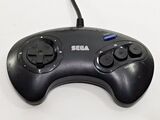
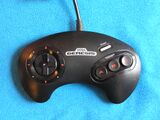
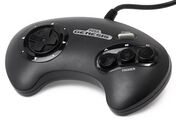
Control pads remained mostly the same across regions, but the colouring can determine the region and revision of the accessory. Early versions of the controller have , and buttons with red lettering. Later versions do not have the red lettering and instead have white lettering above the buttons. A minor addition added in the early 1990s is a little plastic lump on the button, presumably to help users recognise where their right hand thumb was.
Early versions of this controller used the same internals as the original design, but later models have an improved D-Pad mechanism, employing a metal ball-bearing for the pad to rock on. This prevents wear which plagues the original design, which uses a plastic nub for the rocking motion and will eventually wear down with frequent use. Later versions employ a D-Pad with a two-piece fulcrum design as seen on the Six Button Control Pad and all Sega Saturn pads.

SJ-3500 (Japan; 1988)
SJ-3500 (Japan; 1991)
MK-1650 (US; 1989)
MK-1650 (US; 1991)
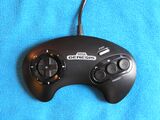
MK-1650 (US; 1991)
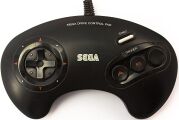
(Europe; 1990)
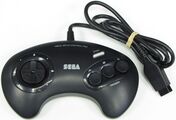
(Europe; 1991)

(Europe; 1993)

(South Korea; 1990)

(South Korea)

(South Korea)
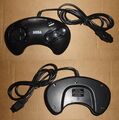
(Brazil; 2017)


Magazine articles
- Main article: Control Pad (Mega Drive)/Magazine articles.
Promotional materials


Physical scans
| Mega Drive, JP (1988) |
|---|
   Cover
|
| Mega Drive, JP (1991) |
|---|
  Cover
|
| Mega Drive, JP (RG-CP1) |
|---|
      Cover
|
| Mega Drive, US (1989) |
|---|
  Cover
|
| Mega Drive, US (1992) |
|---|
  Cover
|
| Mega Drive, US (1993) |
|---|
 Cover
|
| Mega Drive, EU (1990) |
|---|
  Cover
|
| Mega Drive, EU (1993) |
|---|
  Cover
|
| Mega Drive, ES |
|---|
|
| Mega Drive, CA (1989) |
|---|
  Cover
|
| Mega Drive, CA (1993) |
|---|
 Cover
|
| Mega Drive, CA (1993; newer) |
|---|
  Cover
|
| Mega Drive, BR |
|---|
 Cover
|
| Mega Drive, BR (2017) |
|---|
 Cover
|
| Mega Drive, AS† |
|---|
|
External links
- Sega of Japan catalogue page (Japanese): Mega Drive
References